How to test if a printer works from DOS
- The computer needs a parallell port to connect a HP-laser/deskjet
(PCL) compatible printer. (If using a dot matrix printer
this can be either Epson or IBM-compatible).
- The printer has to be 100% DOS compatible. This means
the printer has to be able to work in DOS *without* having
windows running in the background.
With the printer connected to the computer (without or without
the Bailine dongle), type:
C:\ COPY CON PRN
[Enter]
At the next line type something like ...
This is a test
of the printer [Enter]
Exit by pressing Ctrl+Z (Keep the Ctrl-key down while hitting
Z)
IF you do not get the message '1 file(s) copied) or similar, og
if the
printer doesn't print a sheet of paper with what you wrote above,
then the printer is not working from DOS.
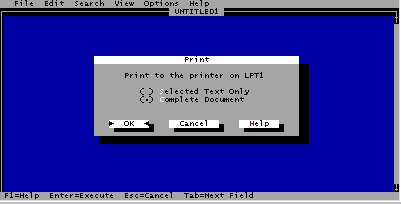
You can also use the program EDIT.COM that is included with
DOS:
C:\ EDIT [Enter]
Type some text (anything) in the windows, like 'This is a test
of the printer'.
Hold down the left Alt-key, hit F (= File) and then
P (= Print), then [Enter]

For further information refer to www.bailine.com/faq
|